5 Claude Code Features Shipped in March 2026 That Every AI Engineering Team Needs to Understand — Before Their Competitors Do
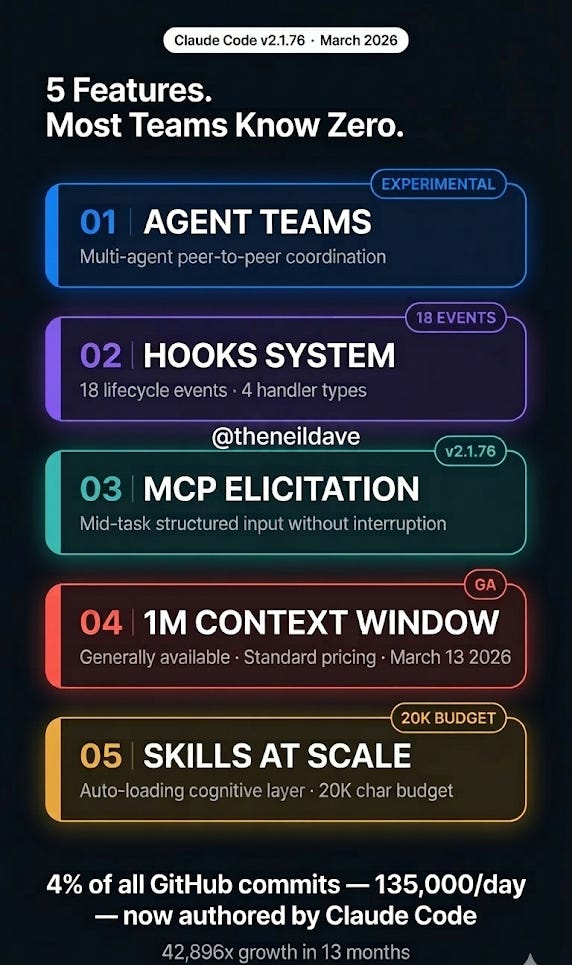
Claude Code v2.1.76 dropped this month with Agent Teams, the Hooks system, MCP Elicitation, the 1M context window GA, and Skills at scale.

Most teams are still using it like an advanced terminal assistant. Here is what the architecture actually looks like now — and why the gap between engineers who understand it and those who don’t is about to become the most significant skill divide in software development.
There is a number that should stop every AI engineering team in its tracks.
4% of all public GitHub commits — approximately 135,000 per day — are now authored by Claude Code. That is a 42,896x growth in 13 months since the research preview. 90% of Anthropic’s own production code is AI-written.
Most engineers reading that statistic will nod and move on. The engineers who should be taking it seriously are the ones who understand what it implies: Claude Code is not a better autocomplete. It is a programmable multi-agent engineering system — and the teams that are generating those 135,000 daily commits have figured out how to build on top of it in a way that most teams have not.
March 2026 was the month that architecture crystallised. v2.1.76 shipped Agent Teams, a 17-event Hooks system, MCP Elicitation, the 1M context window at general availability, and Skills that scale dynamically with context. Each of these features alone is significant. Together, they represent a qualitative shift in what Claude Code actually is.
This post covers the five features that matter, how they interact architecturally, the production failure modes for each, and what you should be building differently starting today.
Feature 1: Agent Teams — Multi-Agent Coordination Is Now First-Class
The single most important architectural change in March 2026 is Agent Teams — experimental, enabled by flag, and the most significant shift in how software engineering workflows can be structured since distributed version control.
The conceptual model is precise. A single Claude Code session has one context window, handles one piece of work at a time, and coordinates any parallel work by spawning subagents that report results back in isolation. Subagents cannot communicate with each other. All coordination flows through the parent session. This creates a hard ceiling on the complexity of work a single session can handle before context degrades and quality collapses.
Agent Teams removes that ceiling.
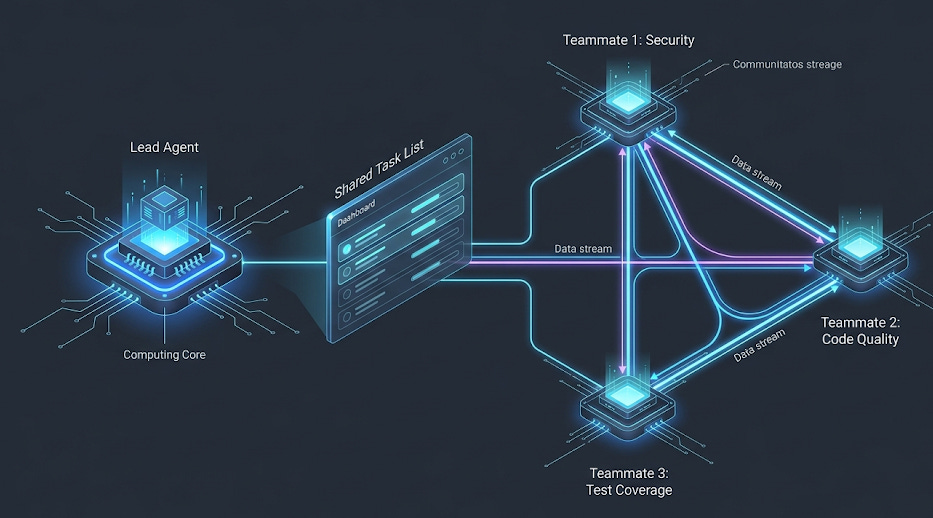
A lead agent coordinates work, assigns tasks, and synthesises results. Teammates are independent Claude Code instances, each with their own full 1M token context window. Critically — and this is the architectural distinction that separates Agent Teams from subagents — teammates communicate directly with each other through a mailbox-based peer-to-peer messaging system. They do not need the lead as an intermediary for every coordination decision.
AGENT TEAMS ARCHITECTURE
=========================

You
 │
 ▼
Team Lead ──────────────────────────────┐
 │                                      │
 ├─ Task List (shared, dependency-aware) │
 │                                      │
 ├─► Teammate 1 (Security)  ◄──────────┤
 │    │                                 │
 │    └──► Direct message ────────────► │
 │                                      │
 ├─► Teammate 2 (Code Quality)          │
 │    │                                 │
 │    └──► Direct message ────────────► │
 │                                      │
 └─► Teammate 3 (Test Coverage)         │
      │                                 │
      └──► "Auth issue confirmed,        │
            also OWASP violation"       │
           Direct to Teammate 1 ───────►│

Each teammate: 1M token context window (isolated)
Communication: Peer-to-peer mailbox, not relay through lead
The practical implication is significant. When Teammate 1 finds a security issue, it can message Teammate 2 directly: “Found auth issue in line 45.” Teammate 2 can reply: “Confirmed, also see OWASP violation.” The lead synthesises findings from teammates who have already coordinated with each other. This is the difference between a manager who relays every message and a team that can just talk to each other directly.
Enabling it is one line:
// .claude/settings.json
{
  "env": {
    "CLAUDE_CODE_EXPERIMENTAL_AGENT_TEAMS": "1"
  }
}
From there, describe the team structure in natural language. Claude handles spawning and coordination:
> I'm reviewing a large PR that touches authentication, database
  migrations, test coverage, and documentation. Create a team:
  one teammate per area. Have them coordinate findings before
  reporting back.
The system spawns roles from the description — and sometimes roles you did not explicitly request. In documented experiments, asking for strategist, copywriter, visual concept, and reviewer produced a researcher and copy editor in the second pass without being asked. The lead infers necessary coordination roles from the task structure.
The token economics. Agent Teams use roughly 15x more tokens than a single-session workflow. A 3-agent team costs approximately 2.5x more in tokens but completes work approximately 2x faster. At $100+ hourly billing rates, the extra $5-10 per session pays for itself in minutes. The real value is parallel investigation — debugging five hypotheses simultaneously instead of sequentially, with teammates that can challenge each other’s theories and prevent the anchoring bias that sequential debugging produces.
The production failure modes you need to know:
Task status lag is the most common. Teammates sometimes fail to mark tasks as completed, which blocks dependent tasks in the shared list. The system appears stuck. The fix is to check whether the work is actually done and nudge the lead to update status manually.
Session resumption breaks teammate state. /resume and /rewind do not restore in-process teammates. After resuming a session, the lead may attempt to message teammates that no longer exist. When this happens, spawn fresh teammates and brief them on current state.
Lead agent implementation drift. The lead sometimes starts implementing work instead of delegating. The intended architecture is coordination-only for the lead. Fix it with an explicit constraint: “Wait for your teammates to complete their tasks before proceeding.” Or use delegate mode (Shift+Tab) which restricts the lead to coordination-only tools.
When to use Agent Teams vs subagents: The deciding question is whether your workers need to communicate with each other. Subagents for quick, focused tasks that report back in isolation. Agent Teams for work requiring collaboration — multiple specialists discovering things that affect each other’s work in real time. For sequential tasks, same-file edits, or tightly interdependent work, a single session or subagents are more cost-effective.
Feature 2: The Hooks System — 18 Lifecycle Events, 4 Handler Types
The Hooks system shipped in early 2026 and was extended significantly in the March releases. It is the feature most teams have heard about and the feature most teams have underestimated.
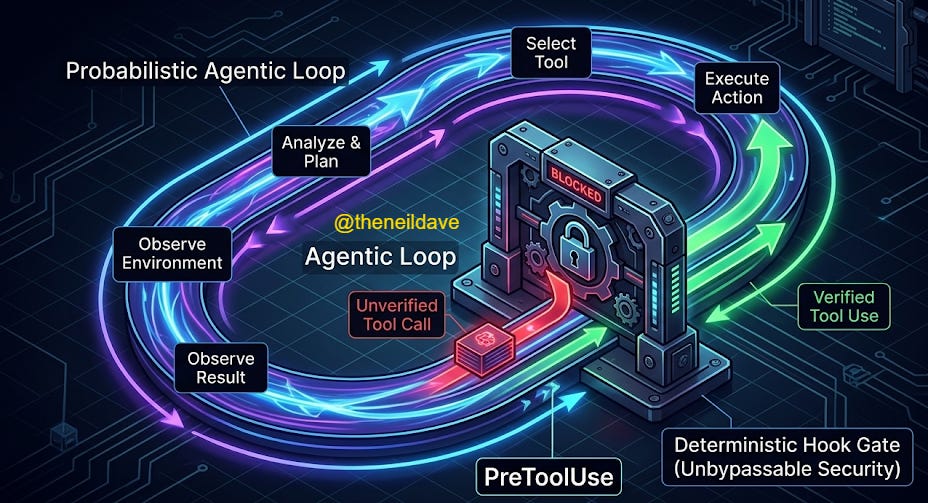
The accurate mental model: hooks are middleware for the agentic loop. They intercept specific lifecycle events, run deterministic logic at those interception points, and optionally control whether execution proceeds. Claude cannot override them. They are not suggestions the model can reason around. They run because an event fired, not because the LLM decided to run them.
This distinction matters enormously for production AI engineering. The rest of Claude Code’s behaviour is probabilistic — the model decides what to do based on context, instructions, and learned patterns. Hooks are deterministic. They always execute when configured.
There are 18 hook events in the current release, covering the complete lifecycle:
CLAUDE CODE HOOK EVENT MAP
===========================

SESSION LIFECYCLE
┌──────────────────────────────────────────────────┐
│ Setup         → pre-session init (--init flag)   │
│ SessionStart  → startup / resume / clear         │
│ SessionEnd    → exit / sigint / error             │
└──────────────────────────────────────────────────┘
                        │
                        ▼
AGENTIC LOOP (fires repeatedly)
┌──────────────────────────────────────────────────┐
│ UserPromptSubmit  → before Claude sees prompt    │
│                                                  │
│   ┌─ PreToolUse    → CAN BLOCK (exit code 2)     │
│   ├─ PermissionRequest → permission dialogs      │
│   ├─ PostToolUse  → after tool success           │
│   └─ PostToolUseFailure → after tool failure     │
│                                                  │
│ Stop → when Claude finishes responding           │
│ Notification → async, non-blocking               │
└──────────────────────────────────────────────────┘
                        │
                        ▼
MULTI-AGENT (fires for subagent/team events)
┌──────────────────────────────────────────────────┐
│ SubagentStart     → when a subagent spawns       │
│ SubagentStop      → when a subagent finishes     │
│ TeammateIdle      → teammate about to go idle    │
│ TaskCompleted     → when a task finishes         │
└──────────────────────────────────────────────────┘
                        │
                        ▼
MAINTENANCE
┌──────────────────────────────────────────────────┐
│ PreCompact  → last chance before compaction      │
│ PostCompact → after compaction completes         │  ← NEW March 2026
│ ConfigChange → config file modified              │
│ WorktreeCreate / WorktreeRemove → git worktrees  │
└──────────────────────────────────────────────────┘

NEW IN MARCH 2026:
┌──────────────────────────────────────────────────┐
│ Elicitation / ElicitationResult → MCP mid-task  │
│ input interception and override                  │
└──────────────────────────────────────────────────┘
PreToolUse is the highest-value event for production teams. It is the only hook that can block execution — return exit code 2 and Claude cannot proceed with the tool call. This is the enforcement mechanism for security policies, file protection rules, and mandatory review gates.
Four handler types determine what runs when a hook fires:
Command hooks — shell scripts, the most common type. Receive JSON context via stdin, return decisions via exit codes. Blocking (exit 2), proceeding (exit 0), or async (non-blocking, fire-and-forget).
HTTP hooks — POST to a web server instead of running a local script. The server receives the same JSON that command hooks get via stdin, as the POST body. This opens production patterns that were previously awkward: remote validation services enforcing team-wide policies, centralised audit logging pipelines, compliance systems that live outside the local development environment.
{
  "hooks": {
    "PreToolUse": [{
      "matcher": "Bash",
      "hooks": [{
        "type": "http",
        "url": "http://localhost:8080/hooks/pre-tool-use",
        "timeout": 30,
        "headers": { "Authorization": "Bearer $MY_TOKEN" },
        "allowedEnvVars": ["MY_TOKEN"]
      }]
    }]
  }
}
Prompt hooks — single-turn LLM evaluation via Claude Haiku by default. The hook receives the event context and a prompt, the model returns a yes/no decision. Use for semantic evaluation that cannot be expressed as a regex or shell condition — “does this command appear to be deleting production data?”
Agent hooks — spawn a subagent with up to 50 tool-use turns to inspect the codebase before returning a decision. Use for deep verification that requires codebase context — “does this change break the API contract?”
The configuration structure is three-level nesting: event → matcher group → handler array.
{
  "hooks": {
    "PreToolUse": [{
      "matcher": "Bash",
      "hooks": [{
        "type": "command",
        "command": "./scripts/security-check.sh"
      }]
    }],
    "PostToolUse": [{
      "matcher": "Bash",
      "hooks": [{
        "type": "command",
        "command": "bash -c 'INPUT=$(cat); CMD=$(echo \"$INPUT\" | jq -r \".tool_input.command\"); echo \"[$(date -Iseconds)] $CMD\" >> ~/.claude/audit.log'",
        "async": true
      }]
    }],
    "PreCompact": [{
      "hooks": [{
        "type": "command",
        "command": "node .claude/hooks/backup-core.mjs"
      }]
    }]
  }
}
Three hooks that every production team should implement immediately: a PreToolUse security gate on Bash commands (blocks destructive patterns before execution), a PostToolUse async audit log (complete shell command history with timestamps, zero blocking overhead), and a PreCompact context backup (captures session state before compaction so multi-hour sessions survive without losing precision).
The production failure mode to know: Hooks can be scoped at global (~/.claude/settings.json), project (.claude/settings.json), and skill/subagent level (frontmatter). Enterprise administrators can use allowManagedHooksOnly to block user, project, and plugin hooks entirely — which means hooks you are counting on in a managed environment may be silently disabled. Always verify hook scope in production environments.
Feature 3: MCP Elicitation — Mid-Task Structured Input Without Workflow Interruption
MCP Elicitation shipped in v2.1.76 and is the least understood of the March 2026 features. It is also the one with the highest leverage for teams building production agentic workflows on top of external services.
The problem it solves: MCP servers previously had no mechanism to request structured input from users or orchestrating systems during task execution. If an MCP server needed additional information partway through a complex operation — authentication credentials, configuration choices, approval for a sensitive action — the only option was to interrupt the entire workflow and ask the user directly, breaking the agentic execution pattern.
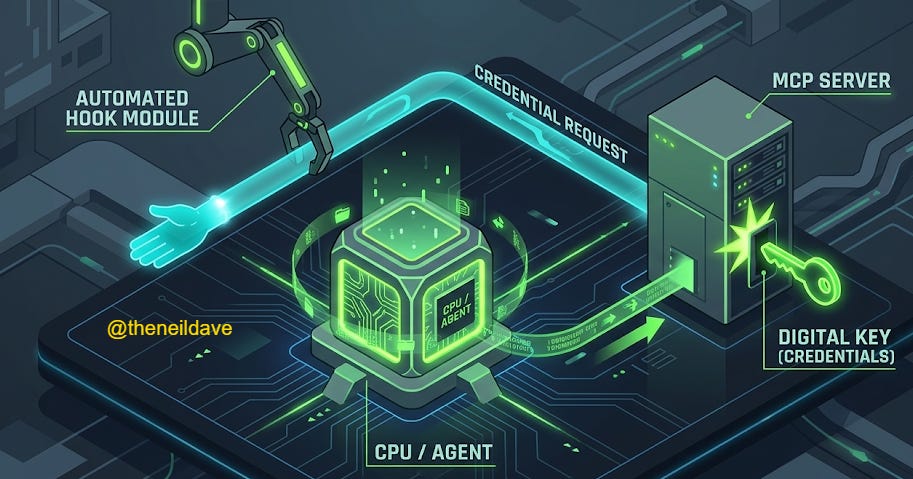
MCP Elicitation changes this. An MCP server can now display an interactive form or open a URL to collect data during execution without interrupting the broader workflow. The Elicitation and ElicitationResult hooks allow intercepting these requests and programmatically providing responses — which means automated pipelines can handle elicitation programmatically, without human intervention, while still respecting the structured input contract the MCP server expects.
WITHOUT MCP ELICITATION
========================
Agent executes task
  → MCP server needs auth credentials
  → MCP server has no way to ask
  → Task fails or MCP server uses stale config
  → Human must restart with correct context

WITH MCP ELICITATION (v2.1.76)
================================
Agent executes task
  → MCP server needs auth credentials
  → MCP server sends Elicitation request
  → ElicitationResult hook intercepts
  → Hook provides credentials programmatically
  → Task continues without interruption
  → Human sees completed result
The ElicitationResult hook is the key. For teams running automated pipelines — CI/CD agents, scheduled maintenance tasks, autonomous refactoring pipelines — this closes the loop between MCP server requirements and automated credential/context provision. MCP servers can now be first-class participants in long-running agentic workflows rather than blocking points.
The practical configuration pattern:
{
  "hooks": {
    "Elicitation": [{
      "hooks": [{
        "type": "command",
        "command": "node .claude/hooks/elicitation-handler.mjs"
      }]
    }],
    "ElicitationResult": [{
      "hooks": [{
        "type": "http",
        "url": "http://your-secrets-service/elicitation/result",
        "timeout": 10
      }]
    }]
  }
}
The elicitation handler receives a structured JSON description of what the MCP server needs and returns the appropriate value from your secrets management system, environment configuration, or approval workflow. The ElicitationResult hook fires after the response is processed, allowing logging and audit trails.
What this unlocks in practice: MCP servers that previously required manual configuration on every session can now self-configure mid-task. Database MCP servers can request connection strings. Auth MCP servers can request refresh tokens. Deployment MCP servers can request approval signatures. All of these can be handled programmatically without breaking the agentic loop.
Feature 4: 1M Context Window GA — What Changes Architecturally
As of v2.1.75 (March 13, 2026), the 1M token context window is generally available for Opus 4.6 on Max, Team, and Enterprise plans at standard pricing. No beta header required. No dedicated rate limits. Your standard account limits apply across every context length.
The naive framing is: more context, better performance. That framing misses the architectural implications.
Consider what 1M tokens actually represents. A 200K context window — the previous default — holds approximately 150,000 words, or roughly 500 pages of dense technical documentation. A 1M context window holds 750,000 words — five times that. A full codebase. A complete project history. Every API contract, every migration script, every test file, loaded simultaneously without retrieval.
The architectural shift this enables is not just “Claude can read more code at once.” It is that retrieval as an architecture pattern — pulling relevant context in from a vector store on every request because the context window could not hold everything — becomes less necessary for a significant class of production systems. For Agent Teams specifically, each teammate gets their own 1M token context window. A three-teammate team has access to 3M tokens of combined working context, each isolated but communicable through the mailbox system.
The context management features that shipped alongside the GA:
The /context command now provides actionable diagnostics — identifies which tools are consuming the most context, flags memory bloat, warns when approaching capacity limits, and offers specific optimisation tips. This matters because 1M tokens is the ceiling, not a free pass to be profligate with context loading.
Skills descriptions scale dynamically at 2% of the context window as a budget. On a 200K window, that is 4,000 characters of skill descriptions. On a 1M window, that budget becomes 20,000 characters — allowing significantly more skills to be loaded and discoverable simultaneously without exceeding the allocation. The SLASH_COMMAND_TOOL_CHAR_BUDGET environment variable overrides this limit when needed.
Memory files now include last-modified timestamps, allowing Claude to reason about which memories are fresh and which are stale. On long-running sessions using the full 1M context, this prevents the model from treating six-month-old architectural decisions with the same weight as last week’s refactoring.
The PreCompact and PostCompact hooks become significantly more important at 1M context. On a 200K window, compaction at 30% remaining means you have used 140K tokens. On a 1M window, 30% remaining means you have used 700K tokens — you are much deeper into a session before compaction fires, and the precision loss on compaction is proportionally larger. The token-based backup trigger system — first backup at 50K tokens used, then every 10K tokens after — provides a practical mitigation:
StatusLine display on 1M context session:
[!] Opus 4.6 | 65k / 1m | 6% used  65,000 | 90% free  900,000 → .claude/backups/3-backup.md
This tells you exactly where you are and which backup file to load after compaction. On a 1M window, you will have dozens of backup snapshots captured throughout a complex session instead of losing everything to a single compaction event.
The production implication for context architecture: The question “should we use RAG or load into context?” now has a different answer depending on the use case. For codebases under ~300K tokens, loading directly into context on Opus 4.6 is often preferable to retrieval — it eliminates retrieval latency, removes the risk of missing relevant context from embedding distance cutoffs, and gives the model complete visibility into relationships across the entire codebase. For larger codebases, or where the relevant context is a dynamic subset of a very large corpus, RAG remains the right architecture. The 1M context window does not kill retrieval architectures. It changes the cost-benefit calculation significantly.
Feature 5: Skills at Scale — The Cognitive Layer That Most Teams Have Misconfigured
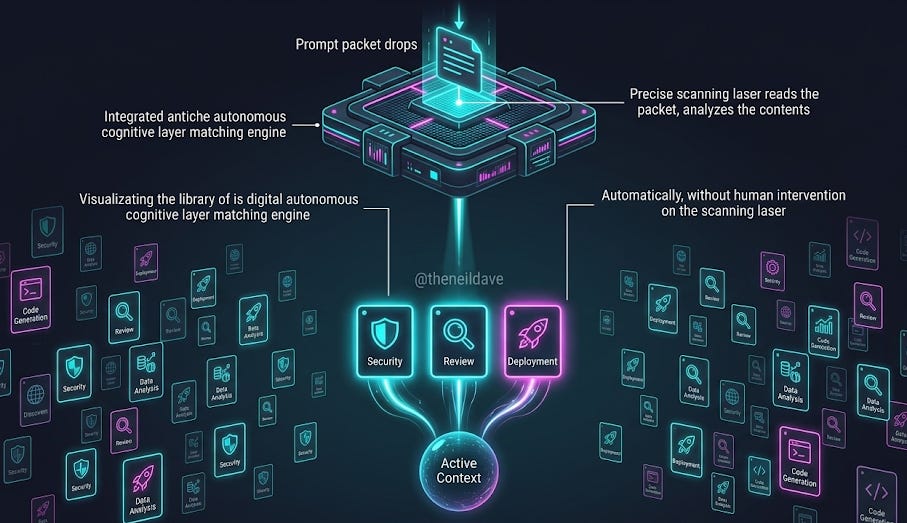
Skills are the least flashy of the March 2026 features and the one with the highest compounding value over time. They are also the most frequently misconfigured by teams that understand them only as “fancy slash commands.”
The distinction that matters: slash commands are explicit, user-invoked prompt templates. Skills activate automatically when their description matches the task context. You never invoke them directly. Claude reads available skill descriptions when you give it a task, identifies which skills are relevant, loads the full skill instructions, and applies them — transparently, without you asking.
HOW SKILLS WORK IN THE AGENTIC LOOP
=====================================

You: "Review this PR for security issues"
        │
        ▼
Claude reads skill descriptions (2% of context budget)
        │
        ├─ "security-review" skill description matches → load full instructions
        ├─ "owasp-checker" skill description matches → load full instructions
        └─ "pr-workflow" skill description matches → load full instructions
        │
        ▼
Claude executes task with all three skills loaded
(You never typed /security-review or /owasp-checker)
A skill is a SKILL.md file with YAML frontmatter and markdown instructions:
---
name: secure-operations
description: Perform operations with security validation. Use when executing
             shell commands, modifying authentication code, or touching
             production configuration. Activates automatically for security-sensitive tasks.
hooks:
  PreToolUse:
    - matcher: "Bash"
      hooks:
        - type: command
          command: "./scripts/security-check.sh"
---

When performing operations on this codebase:
1. Check for secrets in command arguments before executing
2. Verify file paths stay within project boundaries
3. Require explicit confirmation for any rm, drop, or truncate operations
4. Log all Bash commands to the audit trail
This example illustrates the composability that makes Skills powerful at scale: the skill definition includes hooks in its frontmatter. These hooks are scoped to the skill’s lifetime — they activate when the skill loads and clean up when it finishes. A security skill can carry its own PreToolUse enforcement hooks. A deployment skill can carry its own PostToolUse audit hooks. The hook configuration travels with the skill definition rather than being managed separately in settings.json.
For subagents specifically, Stop hooks defined in frontmatter are automatically converted to SubagentStop — they fire when the subagent completes rather than when the main session stops, which is almost always what you want for a task-scoped cleanup hook.
The 1M context window interaction: The skill description budget scales from 16K characters (on smaller windows) to 20K characters (on 1M windows) dynamically. On a large context session, significantly more skills are discoverable simultaneously. The practical guidance: invest in precise, searchable skill descriptions. Claude is matching your task description against skill descriptions to decide what to load. Descriptions that are vague (”helps with code”) load less reliably than descriptions that are precise (”use when performing code review, analysing pull requests, or evaluating diff quality against project standards”).
The production failure mode: The /context command will show a warning when skill descriptions exceed the budget and some skills have been excluded. If you have built workflows that depend on a specific skill loading automatically and it is not loading — the context budget is the first place to check.
How These Five Features Compose
The reason to understand all five features together is that they are designed to compose. The most significant production workflows in Claude Code v2.1.76 are not built on any single feature — they are built on combinations.
Here is what a production-grade Claude Code architecture looks like when all five features are used together:
PRODUCTION CLAUDE CODE ARCHITECTURE (v2.1.76)
==============================================

CONTEXT LAYER (1M tokens per session)
┌──────────────────────────────────────────────────────┐
│ CLAUDE.md — project standards, conventions           │
│ Memory files — cross-session state (timestamped)     │
│ Skills — auto-loaded based on task context           │
│ PreCompact backup — session state preservation       │
└──────────────────────────────────────────────────────┘

EXECUTION LAYER (Agent Teams)
┌──────────────────────────────────────────────────────┐
│ Lead Agent — coordination, task decomposition        │
│ Teammate 1 — specialist context, peer messaging      │
│ Teammate 2 — specialist context, peer messaging      │
│ Shared task list — dependency-aware work tracking    │
└──────────────────────────────────────────────────────┘

ENFORCEMENT LAYER (Hooks — 18 events)
┌──────────────────────────────────────────────────────┐
│ PreToolUse    — security gate, blocks execution      │
│ PostToolUse   — async audit log, async, no block     │
│ PreCompact    — context backup, state preservation   │
│ PostCompact   — session restoration notification     │
│ SubagentStop  — teammate completion handling         │
│ TeammateIdle  — workload redistribution              │
└──────────────────────────────────────────────────────┘

INTEGRATION LAYER (MCP + Elicitation)
┌──────────────────────────────────────────────────────┐
│ MCP servers  — external tools, services, data        │
│ Elicitation  — mid-task structured input requests    │
│ ElicitationResult — programmatic response provision  │
└──────────────────────────────────────────────────────┘
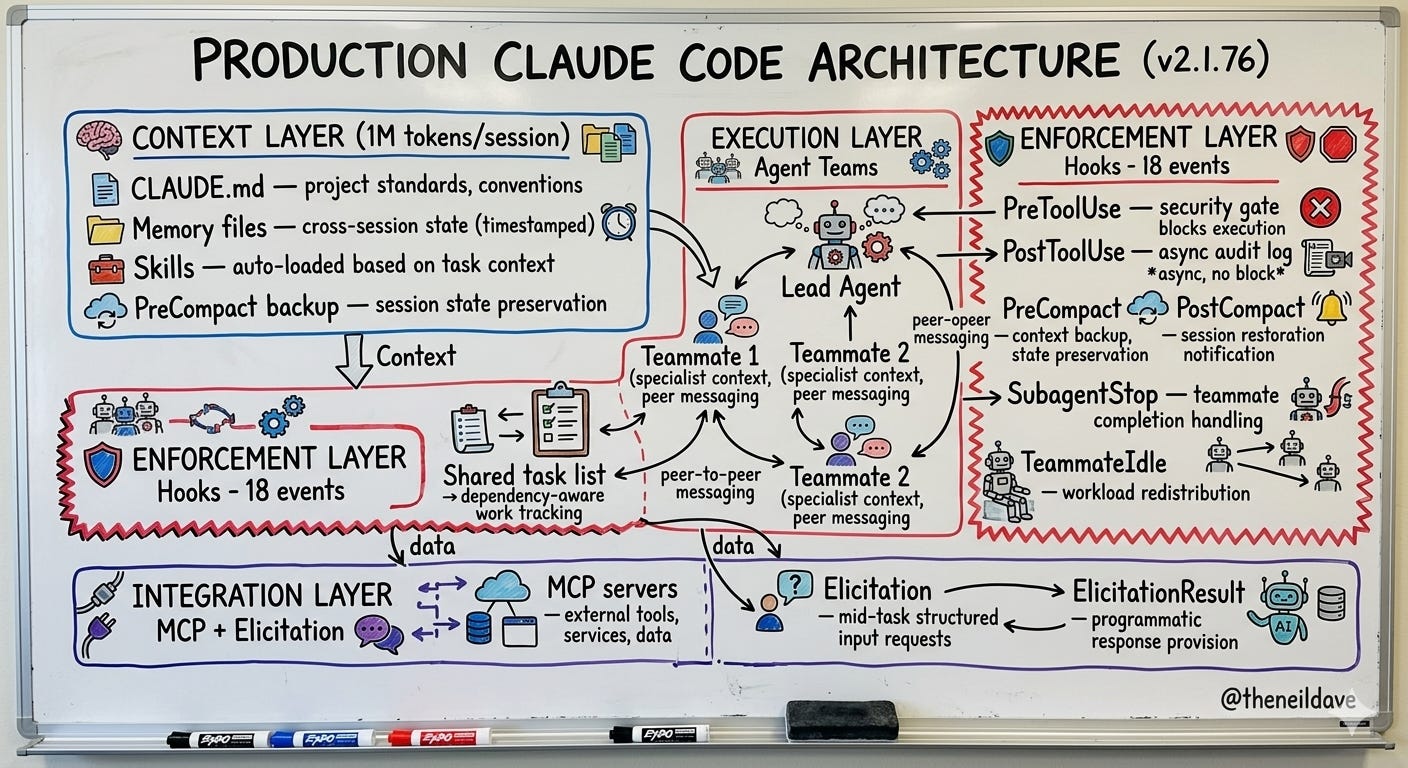
The teams generating those 135,000 daily commits are not using Claude Code as a smarter terminal. They are operating something closer to the architecture above — with the context layer loading the right skills automatically, the execution layer distributing work across coordinated specialists, the enforcement layer ensuring every tool execution is audited and security-gated, and the integration layer connecting to the full stack of external services through MCP without manual credential management.
What This Means for Your Team Right Now
There is a practical sequence to building on this architecture. Not everything at once. Start with the highest-leverage foundations.
Week 1 — Hooks foundation. Implement three hooks in .claude/settings.json: PreToolUse security gate on Bash (blocking), PostToolUse async audit log, PreCompact context backup. These three hooks alone transform a Claude Code installation from a tool you watch into a tool you can trust with production-adjacent work.
Week 2 — Skills library. Write 3-5 skills for your most common workflows. Code review, deployment checklist, security audit, architecture documentation. Invest in precise descriptions. Test that they auto-load by describing the task without invoking the skill directly — if Claude loads the skill unprompted, the description is working.
Week 3 — MCP integration. Connect the MCP servers your team uses most. GitHub MCP for PR workflows, filesystem MCP for large codebase analysis, any domain-specific services your stack uses. Configure ElicitationResult hooks for any MCP servers that require mid-task credentials.
Week 4 — Agent Teams pilot. Enable the experimental flag. Run one complex multi-domain task — a large PR review, a codebase-wide refactor assessment, a security audit with parallel investigators. Watch the token cost. Watch the time savings. Decide whether the cost-benefit math works for your team’s use case.
The engineers who understand this architecture are not just using Claude Code more efficiently. They are building engineering workflows that compound — each skill makes future tasks faster, each hook makes the system more trustworthy, each agent team multiplies throughput on complex work. The gap between these teams and teams still using Claude Code as a terminal assistant is widening with every release.
The question to answer before next sprint planning: which of these five features is your team not yet using, and what is that gap costing you in engineering velocity?
If this changed how you think about your Claude Code setup, share it with an engineer on your team who is still using it as a terminal assistant. The architecture is there. Most teams just haven’t built on it yet.
Using Claude Code in production right now? Specifically curious which hook pattern teams are finding most valuable — drop it in the comments.